Manual Trading Journal Software Built for Review
Record broker-confirmed facts yourself, attach context, and review the data you entered after the trade closes.
Create your free accountAfter signup, choose Free (up to 25 trades) or a 14-day Pro trial. No credit card required.
A trading journal should do more than store entries and exits. The useful version gives every trade enough structure to review it later: what you traded, why you took it, what happened, and which patterns are worth checking again.
Methodology and current product limits
Reviewed July 22, 2026.
The manual workflow is: record broker-confirmed facts, add the thesis and context, attach tags or a screenshot, compare the planned and actual outcome, then review a batch of trades. Madlytics is a review record, not the broker's official confirmation.
The quality of the journal and analytics depends on complete and accurate manual input. Madlytics does not currently provide broker sync, automatic imports, trade replay, backtesting, or AI coaching.
Recordkeeping references: FINRA on checking trade confirmations and FINRA on investor recordkeeping. See also About Madlytics and the Privacy Policy.
What a trading journal is
A trading journal is a structured record of your trades. It keeps trade details, setup context, notes, screenshots, and outcomes in one place so your review is based on evidence instead of memory.
The goal is not to write a long diary for every trade. The goal is to capture enough context that a later review can answer better questions.
That matters because meaningful review usually comes from looking across a set of trades, not judging one trade in isolation.
Trade log vs trading journal
A trade log records what happened: the instrument, entry, exit, size, stop, target, and result. That record is useful, but it is only the first layer.
A trading journal helps explain why it happened and what patterns repeat. It connects the trade record to the setup, context, notes, screenshots, tags, and analytics you need for review.
This is where journaling turns into insight. The log captures the event; the journal makes the event easier to understand later.
Free trading journal
You can start a trading journal in Madlytics on the free forever plan. It costs $0, does not require a credit card, and includes the tools needed to log and review your first trades with structure.
The free plan includes the trading journal, position size calculator, performance dashboard, economic events calendar, and up to 25 trades.
Trading journal
Position size calculator
Performance dashboard
Economic events calendar
Up to 25 trades
Use the free journal to keep trade details, notes, screenshots, tags, and outcomes in one workflow. Madlytics helps you review what happened after the trade is closed; it does not provide trade advice.
Create your free accountChoose Free after signup, or try Pro for 14 days without a credit card.
Before you log the trade, you can also use the free position size calculator to calculate the planned size from account balance, risk, entry, and stop loss.
How journaling turns into insight
A journal works only if you can use it consistently. The workflow should be clear enough that logging a trade feels lightweight, but structured enough that the data is still useful when you review it later.
Step 1
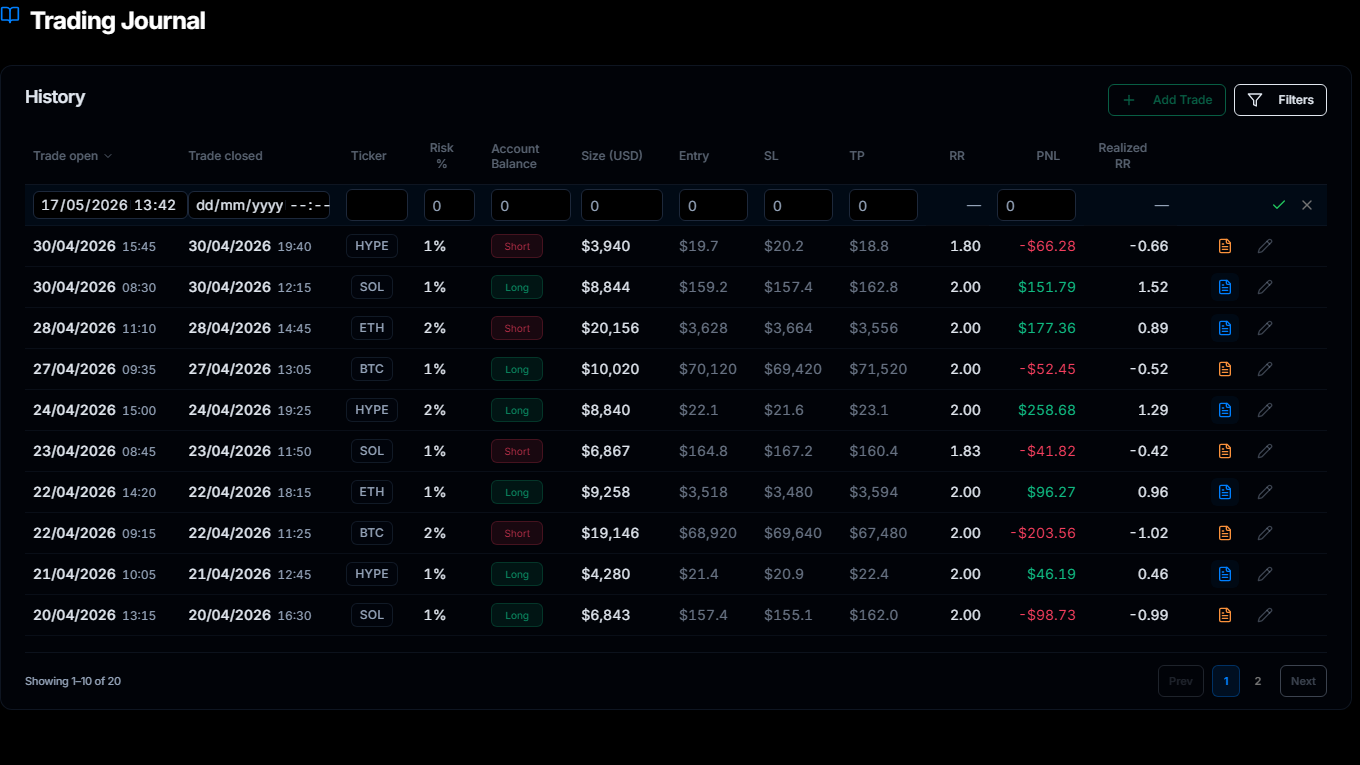
Add the trade in the journal
Capture the trade record first: open and close time, ticker, direction, size, entry, stop, target, R:R, and outcome.
Step 2
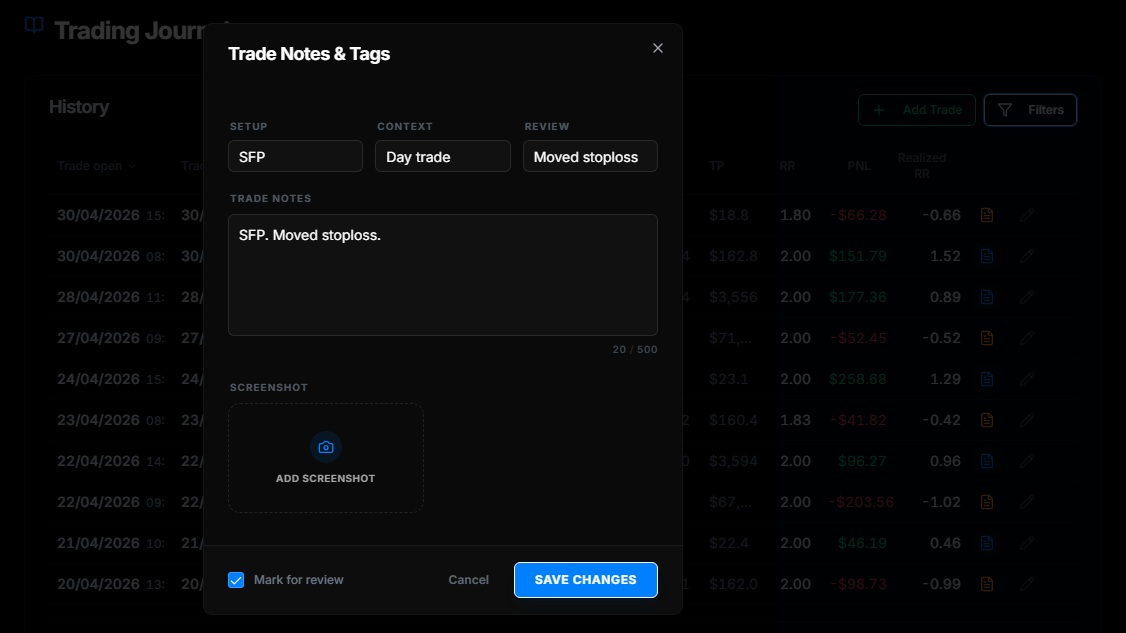
Add notes, tags, and a screenshot
Add setup, context, review tags, written notes, and a chart screenshot while the trade is still fresh enough to remember clearly.
Step 3
Review patterns in analytics
Use analytics after the trade is logged to review performance, compare setups, and decide what deserves more attention.
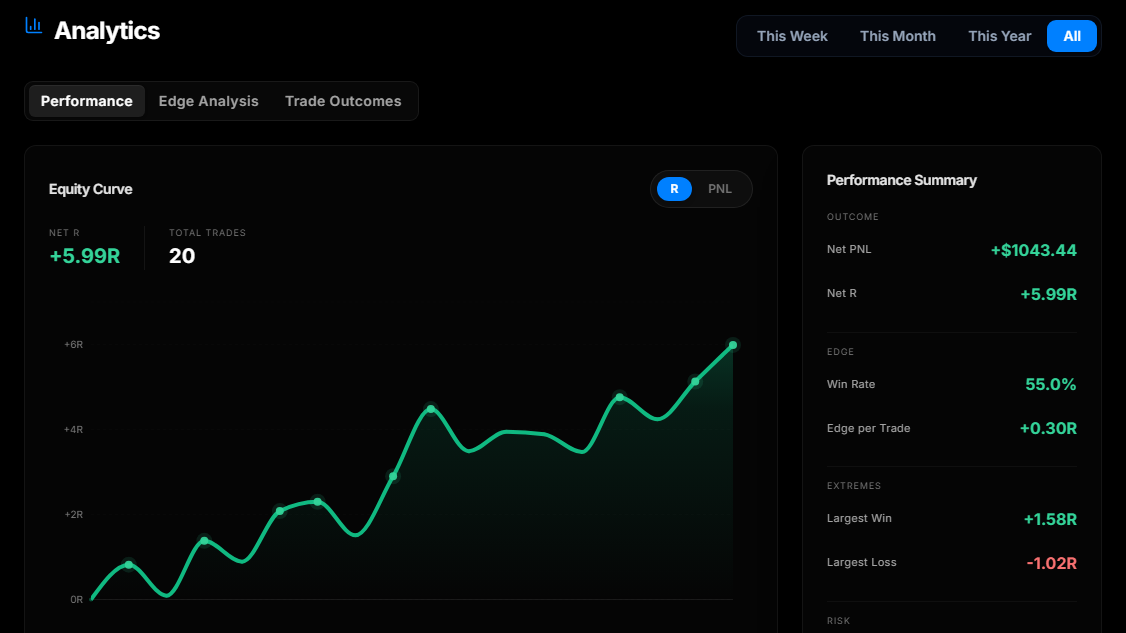
Product screenshots show the current interface with illustrative demonstration trade data. They are not customer results.
What to capture in every trade
You do not need dozens of fields to make a journal useful. Start with the fields that make review possible and keep them consistent across every trade.
Ticker or instrument
Direction and trade size
Entry, stop, and target
R:R and realized R:R
Setup, context, and review tags
Notes and screenshot evidence
The goal is not to create busywork. The goal is to make sure your weekly review has enough structure to answer better questions. Use the post-trade review checklist to keep the review consistent after each trade closes.
If you want the field list first, use the trading journal template as a starting structure before moving into the full workflow.
What structured review helps you answer
Once trades are logged consistently, the journal can support questions that a plain spreadsheet often leaves buried in rows and columns.
Which setups deserve more review? Tagging each trade by setup makes it easier to compare outcomes without relying on memory.
Are losses concentrated in specific conditions? Context tags help separate market conditions, sessions, and trade types.
Is your R:R consistent with your plan? Comparing planned and realized outcomes gives review a more practical starting point.
Which trades need a deeper review? Marking trades for review keeps the follow-up list clear instead of letting important notes disappear.
When a basic log becomes limiting
A spreadsheet or simple log can work when you are still testing what fields matter. It becomes limiting when the review inputs start to separate: formulas in one place, screenshots in another, tags in a third, and notes somewhere else.
That is the point where a dedicated trading journal comparison becomes useful. Not because every trader needs more software, but because the review workflow needs to stay connected as the trade history grows.
Madlytics keeps the record, notes, screenshots, tags, and analytics in the same workflow so the journal is easier to review over time.
Where risk management fits
Risk planning happens before the trade. The journal is where you review whether the trade you took matched the structure you intended to follow.
That is why a journal pairs naturally with a separate position size calculator and a clear risk management process. The calculator helps before entry; the journal helps after the trade is closed.
Insight
A good journal makes review easier to start.
The value is not just that trades are stored. The value is that the next review is easier because the trade details, notes, tags, screenshots, and analytics are already connected.
Scenario
The common journal problem
Many traders do log their trades, but the review still feels unclear. The entry and exit are recorded, yet the context sits somewhere else: chart screenshots in a folder, notes in a document, setup labels in memory, and analytics in a spreadsheet.
That creates friction. The trader technically has the information, but each review starts with assembling it again.
A structured journal reduces that friction by keeping the review inputs together from the start.
Madlytics is built around the full journal loop
Madlytics keeps trade logging, notes, screenshots, tags, and performance review connected in one workflow, so the journal is easier to use after the trade is closed.
Frequently asked questions
What is a trading journal?
What should I write in a trading journal?
Is a trading journal different from a trade log?
Can I use a trading journal for crypto, futures, or stocks?
How often should I review my trading journal?
Can I start a trading journal for free?
Does the free trading journal include the position size calculator?
Start a trading journal that is easier to review
Madlytics gives your trade history the structure needed for notes, screenshots, tags, and performance review without manual spreadsheet maintenance.