How to Review Your Trades Without Guesswork
Use a structured review process to connect each trade record with notes, screenshots, risk context, and analytics.
Start free trial in MadlyticsA useful trade review is not a mood check after a win or loss. It is a repeatable way to inspect what happened, what you planned, what changed, and which patterns show up after several trades are logged. Good post-trade analysis starts from that evidence instead of hindsight.
Review method and limitations
Reviewed July 22, 2026.
Start with broker-confirmed trade facts, then add the original thesis, context, notes, tags, and screenshot. Compare planned risk and execution with the recorded outcome, then review several trades before drawing a pattern conclusion.
A journal can organize review evidence, but it cannot prove causation, guarantee a result, or correct incomplete entries. Madlytics uses manual entries and is not the broker's official record. Product screenshots use illustrative demonstration trade data.
Supporting references: FINRA on checking trade confirmations and FINRA on recordkeeping.
What trade review is for
Reviewing trades helps you separate process from outcome. A winning trade can still be poorly executed, and a losing trade can still follow the plan well.
The goal is to make the next review easier and more specific. Instead of asking whether a trade felt good or bad, you inspect the record, the context, and the pattern across a group of trades.
A simple trade review process
Keep the process short enough to repeat. The best review workflow is the one you can actually follow after a normal trading week.
- Check the entry, stop, target, size, and exit.
- Open the notes, tags, and screenshot for context.
- Compare planned risk with what was actually taken.
- Look for repeated patterns across several trades.
- Choose one practical adjustment to review next.
For a shorter repeatable version of this trade review process, keep the post-trade review checklist beside your journal and use the deeper analysis for weekly pattern review.
How review works in Madlytics
The review works best when the record, notes, screenshots, tags, and analytics are connected. That keeps the review focused on evidence instead of memory.
Step 1
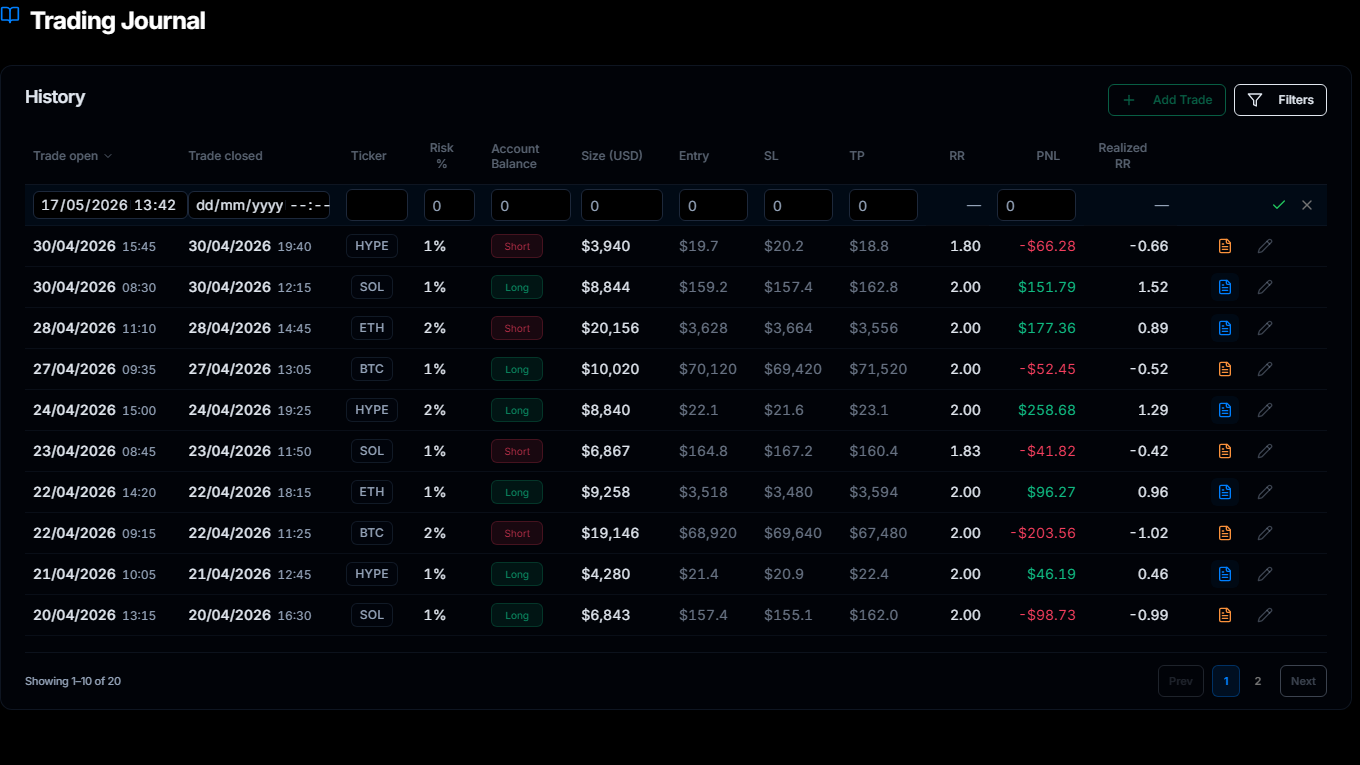
Start from the trade record
Review from the logged trade first: ticker, direction, size, entry, stop, target, R:R, and outcome.
Step 2
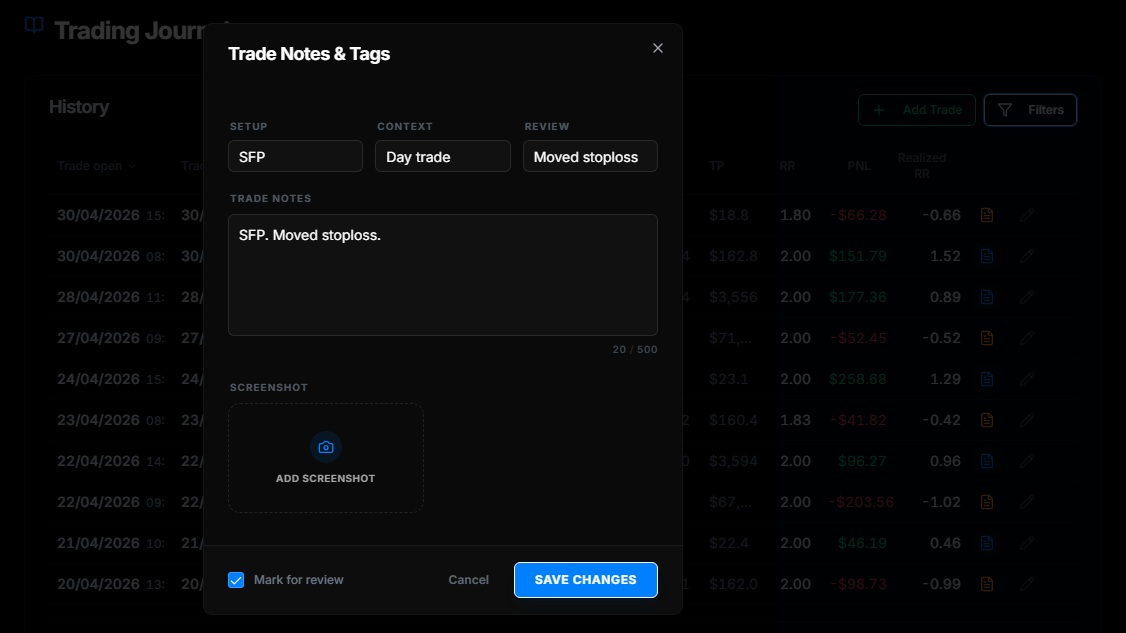
Open the context
Use notes, setup tags, review tags, and screenshots to understand what the trade looked like when it was taken.
Step 3
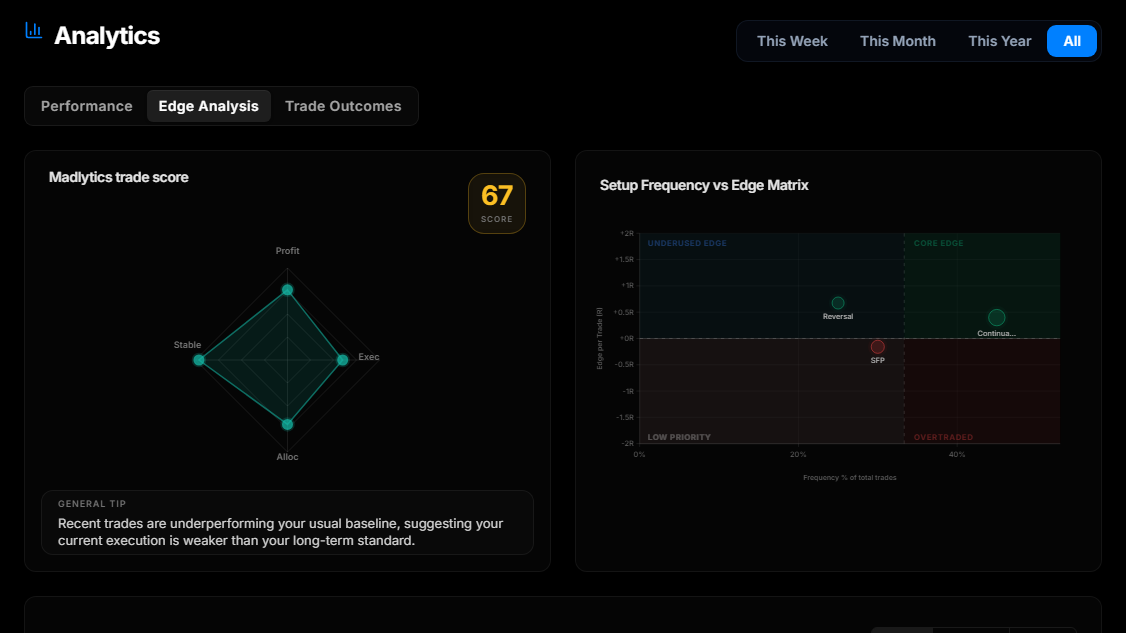
Check the pattern
Use Edge Analysis after several trades are logged to see which setups, contexts, or behaviors deserve attention.
What to ask during review
Good review questions are specific. They should point to something you can check in the trade record, notes, screenshot, or analytics.
Did the entry match the setup you planned to trade?
Was the stop and position size clear before entry?
Did the exit follow the original plan or change during the trade?
What context mattered: session, market condition, setup, or behavior?
What one adjustment should be tested in the next review period?
Review patterns, not just individual trades
One trade rarely explains enough on its own. A single loss might be normal variance. A single win might still have poor execution. Patterns become more useful when you can compare similar trades together.
This is where a structured trading journal helps. Tags, notes, screenshots, and analytics let you review groups of trades instead of scrolling through a list and hoping something stands out.
Where risk fits into review
Risk planning happens before entry. Trade review happens after the trade is closed. The review should check whether the trade matched the risk plan, not rewrite the plan after the result is known.
Use a position size calculator before the trade, then use risk management review afterward to see whether the actual trade stayed close to the plan.
Insight
The best review is specific enough to change the next review.
"Be more disciplined" is not a review output. "Avoid taking this setup during this condition until it has been reviewed again" is more useful because it can be checked later.
Scenario
A practical review example
A trader notices that several losing trades share the same tag: late entry into an already extended move. The next step is not to declare the whole strategy broken. The useful review is narrower.
They open the trades, compare screenshots, check whether the original entry trigger was still valid, and decide whether that setup needs a clearer rule before it is traded again.
That is the kind of review Madlytics is built to support: connected evidence, clear tags, and a repeatable way to inspect the pattern later.
Madlytics keeps the review inputs together
Every trade can carry the record, notes, screenshots, tags, and analytics context in one workflow. That makes weekly review faster to start and easier to repeat.
Frequently asked questions
How do I review my trades?
How often should I review trades?
Should I review winning trades too?
What should I write after each trade?
Does reviewing trades guarantee better results?
Make your next review easier to start
Madlytics helps keep your trade record, context, screenshots, tags, and analytics connected so review does not start from scratch every week.