Best Trading Journal: Compare Options for Structured Review
Compare trading journal software by free access, import workflow, review depth, and where each tool fits. Madlytics is built for structured manual review with a free plan and no credit card required.
Create free accountShort answer: the best trading journal depends on your workflow. Pick broker-sync-first tools if automated import matters most. Pick replay or backtesting tools if you need that depth. Pick Madlytics if you want a structured manual review workflow with trades, notes, screenshots, tags, risk context, analytics, and position sizing connected from the start.
What separates a usable journal from one built for review
The question most traders ask is, "which journal is easiest to use?" Ease of entry matters, but it is only the starting point. Once a journal is fast enough to fill out, the more useful question is what it does with the data after the trade is logged.
Ask this instead: "After 50 trades, what can this journal help me review?" If the answer is only a list of trades with P&L, you may need the basics of a trading journal workflow first. If the answer includes setup performance, R:R distribution, screenshots, context tags, and review notes, you are evaluating the right kind of tool.
If your journal cannot make review easier, it is documenting trades more than helping you learn from them.
A trading journal as a spreadsheet alternative
Excel and Google Sheets can record trades. They are flexible, familiar, and useful when you are still figuring out which fields matter. A trading journal app becomes more useful when the review process gets heavier than the log itself.
Screenshots move into folders. Notes sit in separate cells or documents. Tags change names over time. Context gets harder to compare across many trades. Analytics depend on formulas, filters, and charts that have to be maintained.
The issue is not that spreadsheets are useless. It is that the trader ends up maintaining the review system manually when the goal should be faster understanding.
Use a template to pressure-test the journal decision
If you are moving from a spreadsheet, start by listing the fields your review actually needs. A practical trading journal template can show whether you only need a clean log or whether the workflow is already too connected for a spreadsheet.
The important test is not whether a template can store the trade. It is whether you can still review the trade after the screenshot, setup tag, risk note, and follow-up action need to stay connected across many entries.
Trade log fields
A template should keep date, market, direction, entry, exit, stop, target, size, fees, and result consistent.
Review context
The review should preserve setup, thesis, invalidation, screenshots, notes, execution rating, mistake tags, and follow-up action.
Risk and analytics
The system should make planned risk, final result, R-multiple, setup tag, market condition, and review status easy to compare later.
Template handoff
A spreadsheet can start the habit; a connected journal helps when notes, screenshots, tags, and analytics become hard to maintain manually.
Use the template as a starting structure. If the review starts depending on separate folders, manual formulas, and reconstructed context, compare full journal systems that keep those pieces together.
Why a generic journal can still fall short
A dedicated trading journal is usually a step up from a spreadsheet. It can make entries cleaner, reduce setup work, and keep trades easier to browse. But a journal can still track trades without creating a repeatable review process.
The difference is whether the tool helps you connect the record to the review: what setup was traded, what context mattered, what the screenshot shows, and which pattern deserves attention next.
That is the buyer decision. You are not just choosing where trades are stored. You are choosing how quickly your trade history turns into something you can inspect.
If you are still deciding which fields to track, start with a practical trading journal template before comparing full journal systems.
Criteria to use when choosing a trading journal
1. Structured trade record. The important fields should stay consistent enough that review does not depend on memory or cleanup.
2. Notes and screenshots. Trade context should stay attached to the trade instead of becoming a separate archive to search later.
3. Tagging. Setup, context, and review tags should make it easier to compare similar trades.
4. Risk and position-size context. The journal should make it easy to compare the trade you planned with the size, stop, and risk you actually used. For pre-trade sizing, use a position size calculator.
5. Analytics. Performance views should help you understand patterns without rebuilding a spreadsheet report.
6. Review workflow. The journal should make the next review obvious: what to inspect, what changed, and which context matters.
7. Low setup friction. A good system should reduce maintenance, not create another tool the trader has to rebuild every week.
Bridge the decision to the right review asset
The comparison page is the decision hub. Use the supporting pages when the question becomes more specific: what to log, how to review, which fields matter, or how risk planning connects to the journal.
Start with the full journal workflow
Use this when you need the basics: what to log, how the journal differs from a trade log, and where review starts.
Trading journal workflow ->Pressure-test spreadsheet fields
Use this when you are comparing a spreadsheet or template against a connected review workflow.
Trading journal template ->Check the review process
Use this to test whether a journal can keep trade facts, screenshots, tags, risk, and follow-up actions together.
Post-trade review checklist ->Plan risk before the journal entry
Use this before entry so planned size, stop distance, and dollar risk can be reviewed after the trade closes.
Position size calculator ->Use a post-trade checklist to test each journal
A trading journal can look complete in a feature list and still be weak during real review. Before choosing a tool, test whether it can support the same post-trade review checklist you would use after a closed trade.
The checklist test keeps the decision practical: can the journal preserve the facts, context, risk, screenshots, tags, and follow-up action you will need after the trade is no longer fresh?
Trade facts stay consistent
The journal should keep entry, exit, size, stop, target, timing, and outcome fields consistent enough to compare later.
Context stays attached
Notes, screenshots, setup labels, and review tags should stay connected to the trade record instead of living in separate files.
Risk is reviewable
Planned risk, actual size, stop placement, and exit behavior should be easy to compare after the trade closes.
Patterns are visible after batches
The tool should make it easier to review repeated setups, mistakes, and behaviors after several trades, not just one result.
If a journal handles this checklist well, it is more likely to help with structured review instead of only storing finished trades.
What to avoid when choosing a trading journal
Be careful with tools that lead with engagement features before review structure. Community feeds, leaderboards, or trade sharing can be useful in some contexts, but they do not replace a clear private review workflow.
Also be careful with any workflow that forces you back into spreadsheet maintenance for basic review questions. If notes, screenshots, tags, and analytics are disconnected, the tool may still feel like a cleaner logbook rather than a real review system.
What product proof should show
A comparison page should not ask you to trust feature claims alone. Look for proof that the product can keep the trade record, context, and review view connected in the actual workflow.
The practical test is whether the journal supports the same post-trade review checklist you would use manually: trade facts, setup context, screenshots, tags, execution notes, and a clear follow-up action.
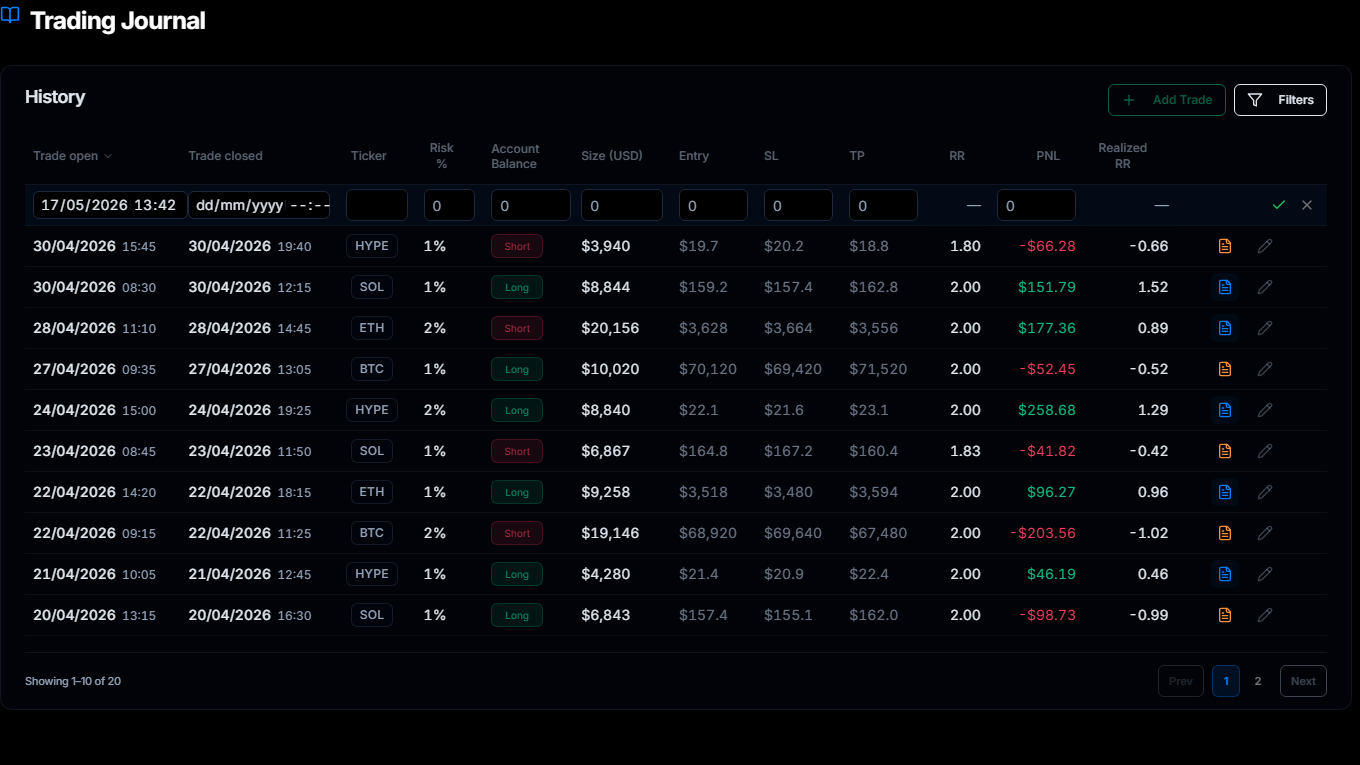
Trade record proof
A serious journal should show the trade fields you will need later, not just a loose notes area.
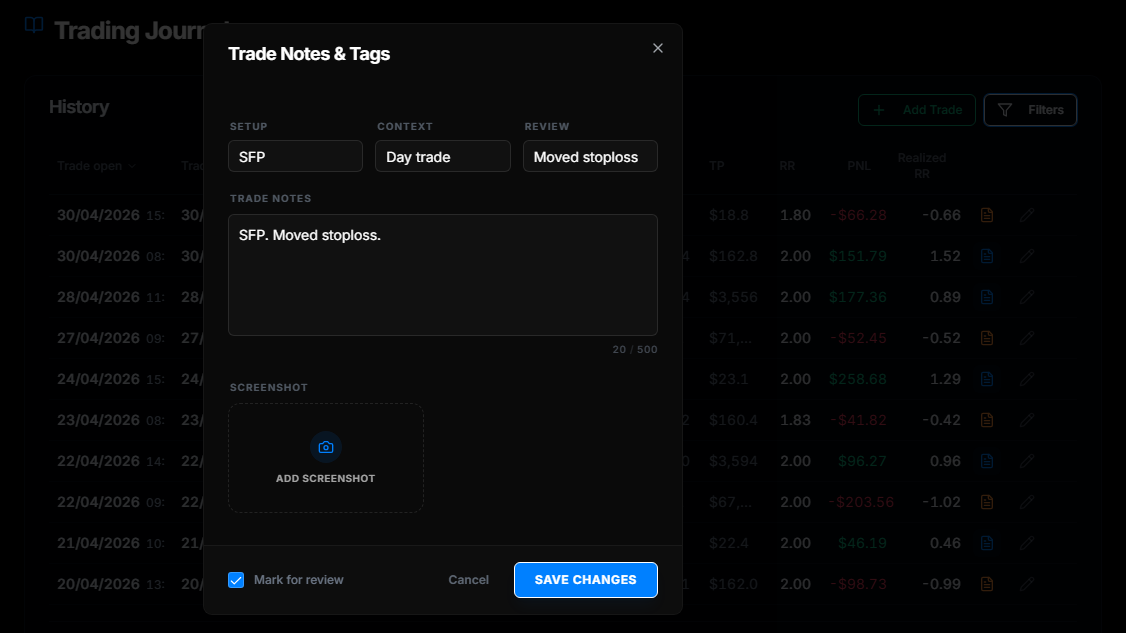
Context proof
Notes, tags, and screenshots should stay close to the trade so review does not depend on memory.
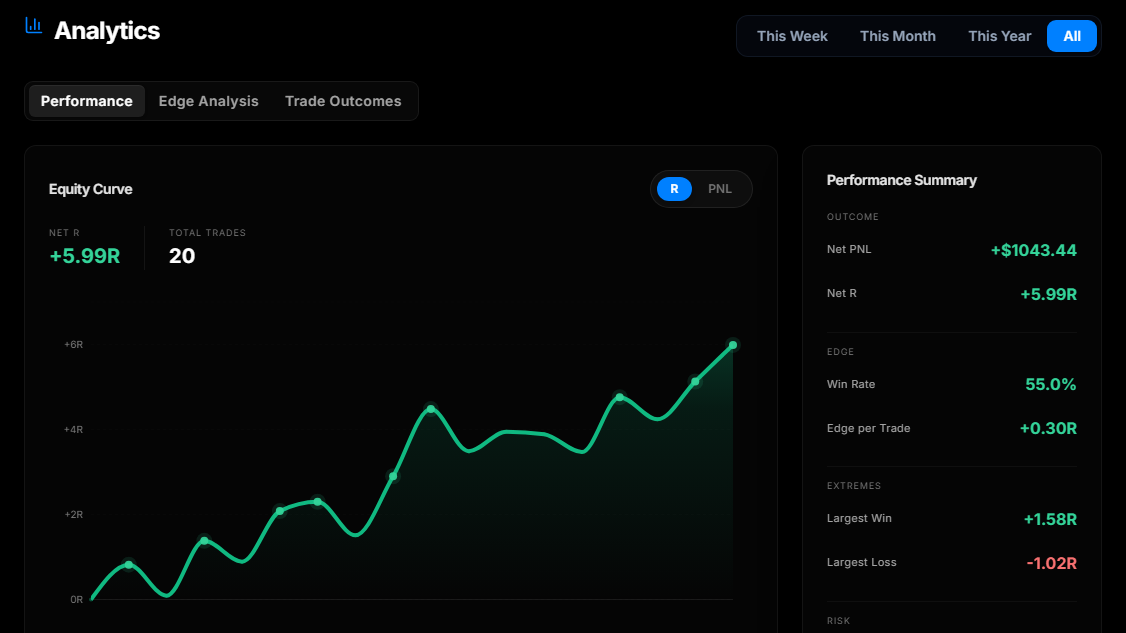
Review proof
Analytics should help you inspect patterns after trades are logged, without rebuilding reports by hand.
Product screenshots show the current Madlytics interface with illustrative demonstration trade data. They are not customer results.
Best trading journal software comparison
Last checked July 22, 2026. This comparison uses publicly advertised capabilities on official product, pricing, and help pages; it is not a hands-on performance or security test. Features and plan availability can change. Use it as a workflow-fit filter, not an objective ranking.
| Tool | Free or trial signal | Import method | Stand-out focus | Best fit |
|---|---|---|---|---|
| Free or trial signalFree plan up to 25 trades; 14-day Pro trial with no payment info. | Import methodManual journal entries; no broker sync required. | Stand-out focusStructured review with records, notes, screenshots, tags, risk context, analytics, calendar, dashboard, and position sizing. | Best fit Structured manual review without broker sync. | |
TradervueOfficial source | Free or trial signalFree signup is available; paid Silver and Gold plans offer trials. The free plan has a monthly import quota. | Import methodBroker trade import or sync; generic Excel or text import is documented. | Stand-out focusAutomatic price charts, reporting, mentoring, community sharing, and Gold-plan exit analysis. | Best fit Broker-import, chart and report, mentoring, or community workflows; features vary by plan. |
TraderSyncOfficial source | Free or trial signalA 7-day trial is listed for the public Pro, Premium, and Elite paid plans. | Import methodSupported-account import or sync, with generic CSV for unlisted brokers. | Stand-out focusAnalytics, Cypher AI, Trade Replay on higher tiers, and multi-asset Market Replay or backtesting. | Best fit Broker-connected analytics or plan-dependent replay and backtesting workflows. |
TradeZellaOfficial source | Free or trial signalOfficial July 2026 pricing lists paid Essential, Pro, and Ultra plans. | Import methodAuto-sync, file upload, and manual input. | Stand-out focusStrategies and playbooks, replay, manual and plan-limited automated backtesting, AI features, community, and education. | Best fit Plan-dependent playbook, replay, backtesting, community, and education workflows. |
TradesVizOfficial source | Free or trial signalFree Basic plan; paid tiers and trial path available. | Import methodManual entry, file upload, and broker sync options. | Stand-out focusBroad asset imports, charts and analytics, AI Q&A, simulators, replay, and backtesting depending on plan. | Best fit Multi-asset analysis or plan-dependent simulation and replay workflows. |
Workflow verdict
Choose based on how you review
There is no universal winner. The clearest choice is the workflow that removes the most friction from your own review process.
- Best fit for structured manual review
- Madlytics fits traders who want a clean review workflow, screenshots, tags, risk context, analytics, and a free path without needing broker sync.
- Best fit for broker-synced reporting
- Tradervue, TraderSync, TradeZella, and TradesViz each document broker import or sync workflows; coverage and availability vary by broker and plan.
- Best fit for replay or backtesting depth
- TraderSync, TradeZella, and TradesViz document replay, simulation, or backtesting capabilities; availability varies by plan and asset.
- Best fit for spreadsheet replacement
- Choose the tool that removes the most manual review work: consistent fields, notes, screenshots, tags, and usable analytics without rebuilding reports.
A spreadsheet is fine for a first log. The friction starts when review depends on folders, formulas, and memory. Madlytics keeps records, notes, screenshots, tags, risk context, and analytics connected so there is less cleanup before review.
Insight
A better journal does not need more data. It needs a clearer review path.
A spreadsheet and a journal app can store similar raw fields. The difference is how quickly you can turn those fields into a review: which setup was traded, what the risk plan was, what the screenshot shows, and what pattern is worth checking next.
Scenario
The common spreadsheet problem
Imagine a trader who has logged every trade for months in a spreadsheet. The rows are there, but review still takes work: filter by setup, check the notes, find the screenshot, calculate the R:R, and compare the result with the original plan.
That is where the workflow usually breaks. The trader did log the trade, but the system does not make the next review obvious. If setup tags, screenshots, notes, and outcome data live in separate places, the review becomes another manual project.
A structured journal is useful because it reduces that review friction. It keeps the trade record, context, and analytics connected so you can decide what to inspect without rebuilding the report from scratch.
Madlytics is designed around the review workflow
Madlytics is built for what happens after a trade is logged: reviewing setup performance, R:R distribution, notes, screenshots, tags, and outcomes from one workflow. The free plan supports up to 25 trades with no credit card, and the 14-day Pro trial does not require payment information.
Frequently asked questions
Is there a free trading journal option?
Which trading journal options should active traders compare?
Does Madlytics sync with my broker?
Is the best trading journal always the most expensive one?
Is a spreadsheet or a dedicated app better for trade journaling?
What features should I prioritize in a trading journal?
How does a post-trade review checklist help choose a trading journal?
Can a trading journal improve trading results?
Related resources
- What is a trading journal and how to build one ->
- Free trading journal spreadsheet template ->
- How to review your trades with a structured workflow ->
- Post-trade review checklist for journal consistency ->
- Position size calculator for pre-trade risk planning ->
- Trading analytics software for structured review workflows ->
Choose a trading journal built for structured review
If your journal makes review feel like admin work, it is harder to stay consistent. Madlytics keeps the trade record and review context in one place, with a free path for getting started.